AlmaSpot
2. Design
Index
- Analysis
- Design
- 2.1. Bounded context
- 2.1.1. Core context
- 2.1.2. Search context
- 2.1.3. Notification context
- 2.1.4. Authentication context
- 2.2. Mockups
- 2.1. Bounded context
- Architecture
- Implementation
- DevOps
- License
- Deployment
In this section, we define the software design of AlmaSpot, focusing on how the system’s components differ and interact to fulfill the identified functional requirements. Adopting a Domain-Driven Design (DDD) approach, the monolithic complexity is broken down into four autonomous Bounded Contexts: Core, Search, Notification, and Authentication. This decomposition allows for clear separation of concerns, where each context manages its own specific domain logic and data integrity. The following sections explore the tactical design of these contexts, including their aggregates, entities, and value objects, concluding with a visual representation of the proposed user interface.
2.1. Bounded Context
2.1.1. Core context
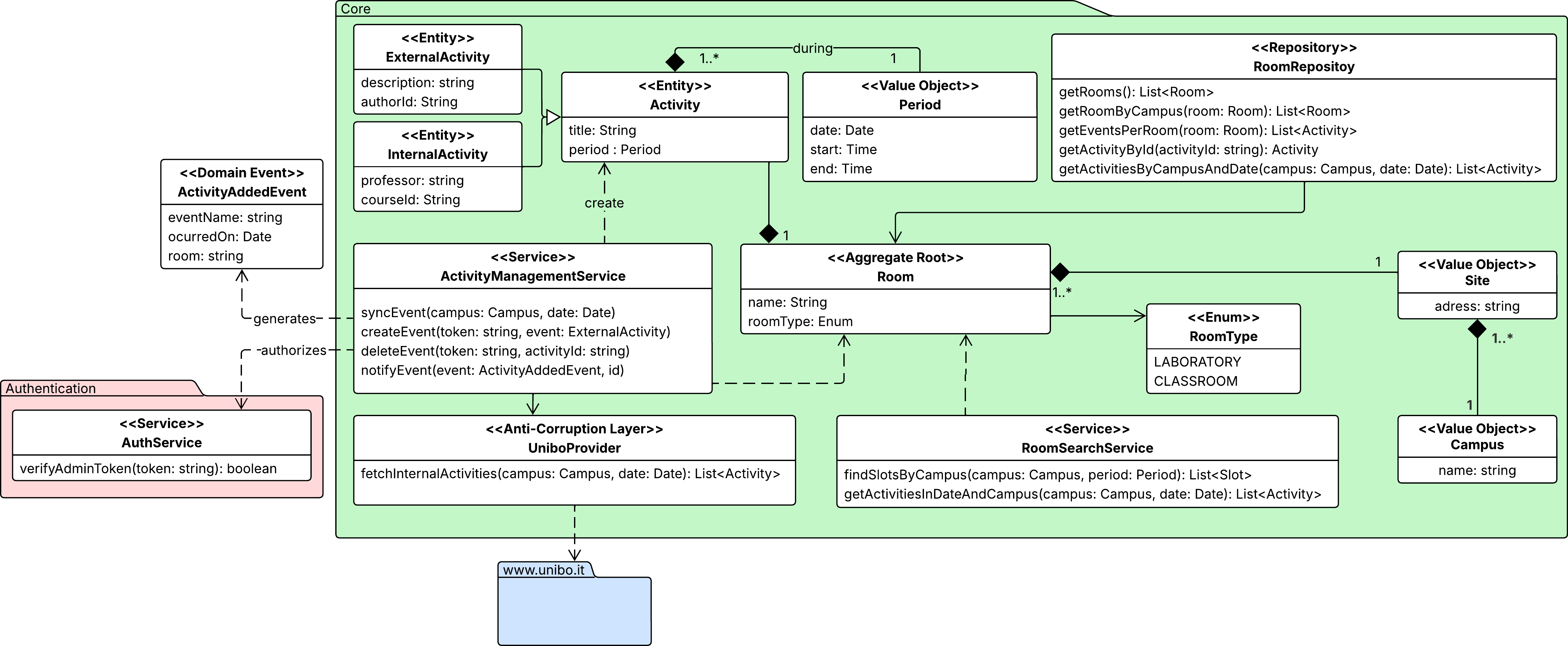
This context is the heart of the system, serving as the definitive source of truth for the physical availability of university spaces. Its domain model is centered around the Room Aggregate Root, which ensures that no double bookings occur: a room is considered available only if no Activity overlaps with the requested Period.
To populate this model, the context implements a Data Provider acting as an
Anti-Corruption Layer (ACL).
This component is responsible for scraping, cleaning, and normalizing heterogeneous schedule
data from the external university portal
(www.unibo.it) into the system’s ubiquitous language.
The context exposes two primary application services:
- The ActivityManagementService, which orchestrates the synchronization of official data and allows administrators to manually insert external activities. This service relies on the upstream Authentication Context to authorize these manual operations via token verification.
- The RoomSearchService, which provides an interface for other contexts to query the availability of specific rooms.
Finally, whenever the state of a room changes due to a new booking, the context publishes an ActivityAddedEvent, enabling the Notification Context to react asynchronously without coupling the logic.
2.1.2. Search context
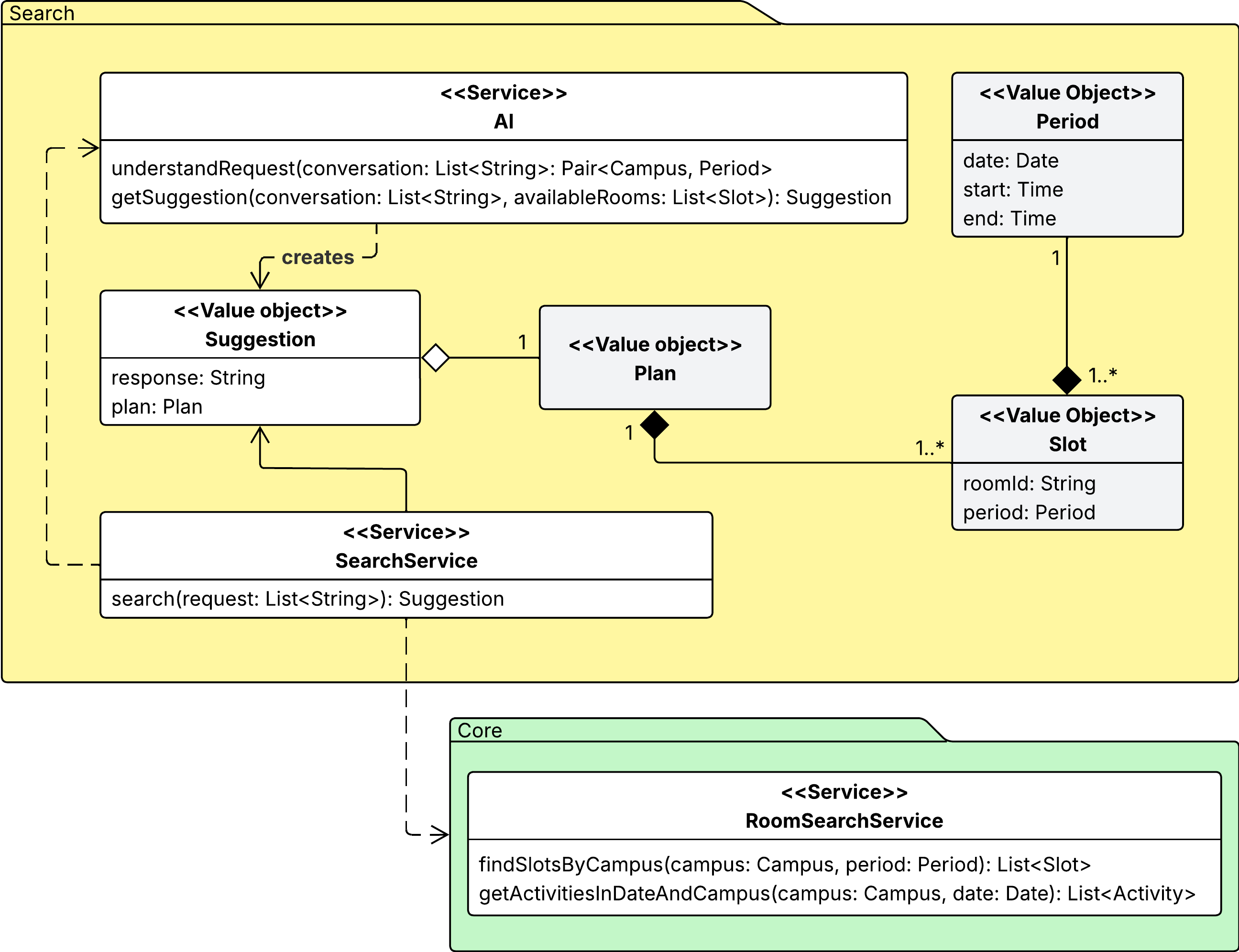
The search context focuses on interpreting and fulfilling students’ requests for available study spaces. Its logic is mainly encapsulated within the Search Service, which manages the resolution strategy: upon receiving a query (as a list of messages), the service first interacts with the AI Service to understand the user’s input and extract structured parameters, such as the desired time slot and campus location.
Using these parameters, the service queries the Room Search Service in the Core Context to obtain currently available Slots that match the user’s criteria. The output is a collection of free slots during the requested period. The search context interacts with external contexts mainly through a Suggestion value object, which contains a natural-language explanation and a structured Plan (a collection of one or more slots), offering the student a compound itinerary.
With this information, the service evaluates whether any slots are available. It queries the AI Service again, providing both the original user prompt and the list of currently available slots. The AI processes this information to generate a Suggestion, offering a possible solution to the student. If the student doesn’t like the suggestion, they can refine their search by sending additional messages.
To facilitate integration, this context relies on a shared kernel strategy. The fundamental concept of Period is shared globally with the core and notification contexts to ensure temporal consistency. Furthermore, the Plan and Slot value objects are shared specifically with the Notification Context. This decision allows the Suggestion generated here to be directly persisted as a Subscription in the Notification module without requiring complex data mapping or translation.
2.1.3. Notification context
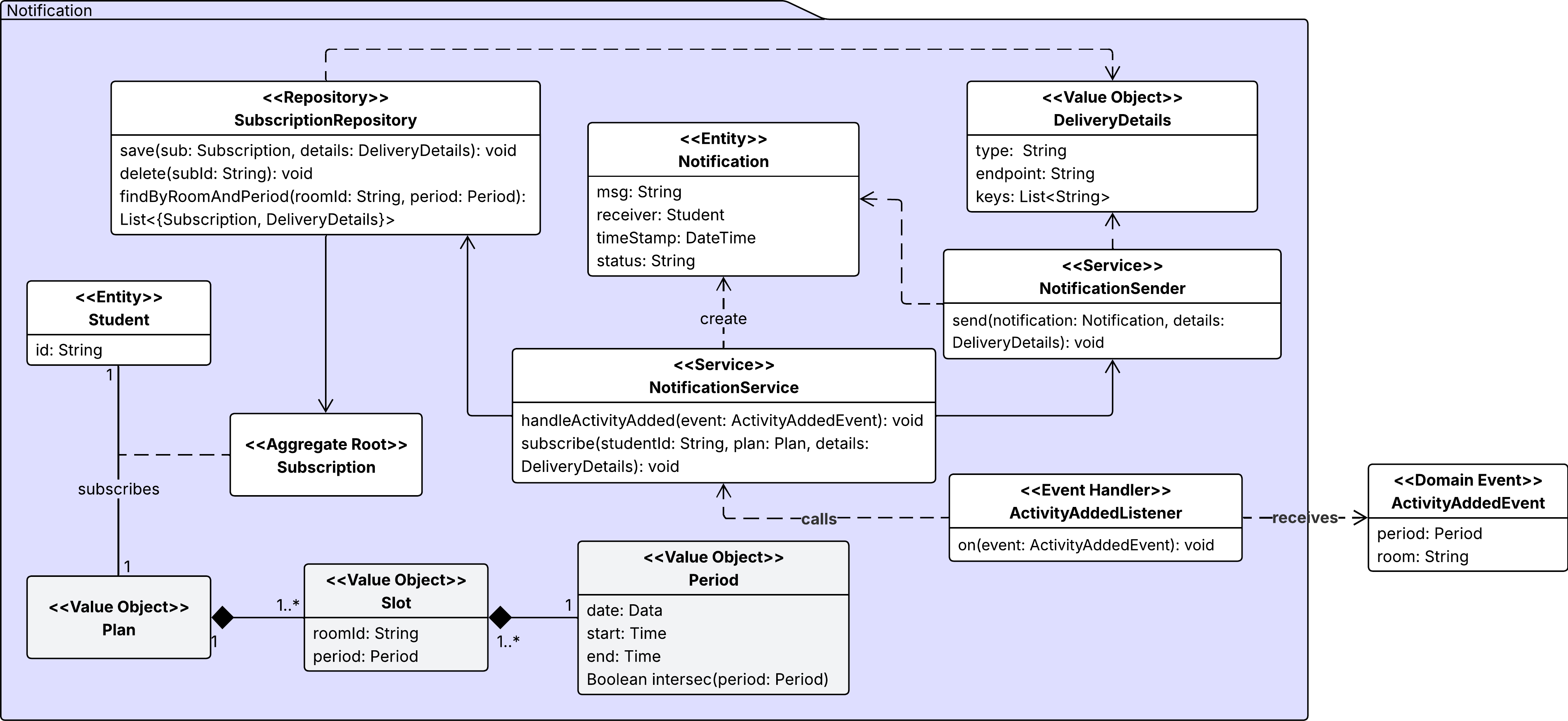
This context manages the proactive behavior of the system, adhering to a Conformist relationship with the Core context. Its primary responsibility is to alert students when a previously available space becomes occupied.
The domain model is centered on the Subscription Aggregate Root, which links a Student to a specific Plan (a collection of Slots) they wish to monitor. The logic is driven by the NotificationService, which acts as an event handler: it consumes the ActivityAddedEvent emitted by the Core whenever a new activity is added. Upon receiving an event, the service checks for temporal intersections between the new activity and the active subscriptions. If a conflict is detected (the student’s planned slot is no longer valid), the system generates a Notification entity, which triggers the delivery of an alert to the user.
2.1.4. Authentication context
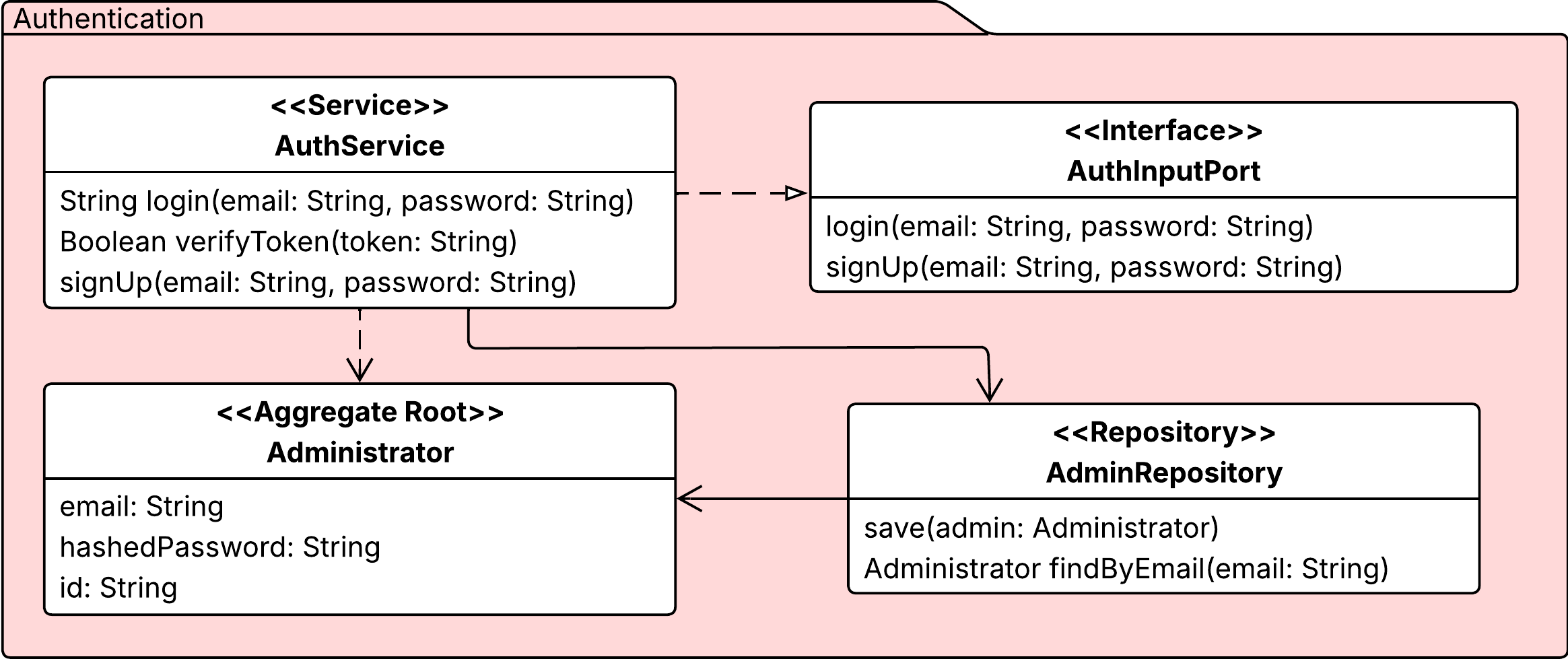
This context is responsible for identity and access management, specifically targeting the Administrator role. It isolates security logic, such as password hashing, from domains to enclose verification logic within the context of authentication.
The AuthInputPort exposes the primary use cases of the authentication: registration (signUp) and authentication (login). The AuthService acting as the concrete gateway that executes the business logic. To ensure security, the Administrator encapsulates sensitive data by storing a hashedPassword.
Upon successful authentication, the service generates a Token. This token serves as a portable, stateless proof of identity that is subsequently used by the Core Context to authorize privileged operations, such as creating or deleting external activities.
2.2. Mockups
We have created a series of mockups for the AlmaSpot user interface design that illustrate the key screens and user interactions. These mockups aim to provide students seeking available study spaces with a clear and intuitive experience. Our mobile-first design ensures accessibility and ease of use on smartphones and tablets.
The mockups include the following screens, from left to right and top to bottom:
- Admin login: a login page for administrators to access the management dashboard.
- Home page: the main landing page where students can start searching for available rooms.
- Admin dashboard: a control panel where administrators can manage room availability and activities. This is shown in two tabs: “Remove” and “Add.” The “Remove” tab allows administrators to remove existing activities, and the “Add” tab allows them to add new ones.
- Results page: this is a dynamic page that displays search results.
- Assistant page: this is a chat-based interface where students can interact with the AI assistant to refine their search, receive suggestions, and, if no direct matches are found, receive alternative plans.
- Admin results pages: two pages showing the results of administrative actions: one page displays the list of currently active activities, and the other page is used to choose rooms when adding a new activity.
- Active plan page: two examples are provided, showing a simple plan with one slot and a compound plan with multiple slots. Details such as an alert in case of a conflict are included.
- Filter panel: this is a pop-up panel that allows students and administrators to apply filters to their search, such as room site and room type.
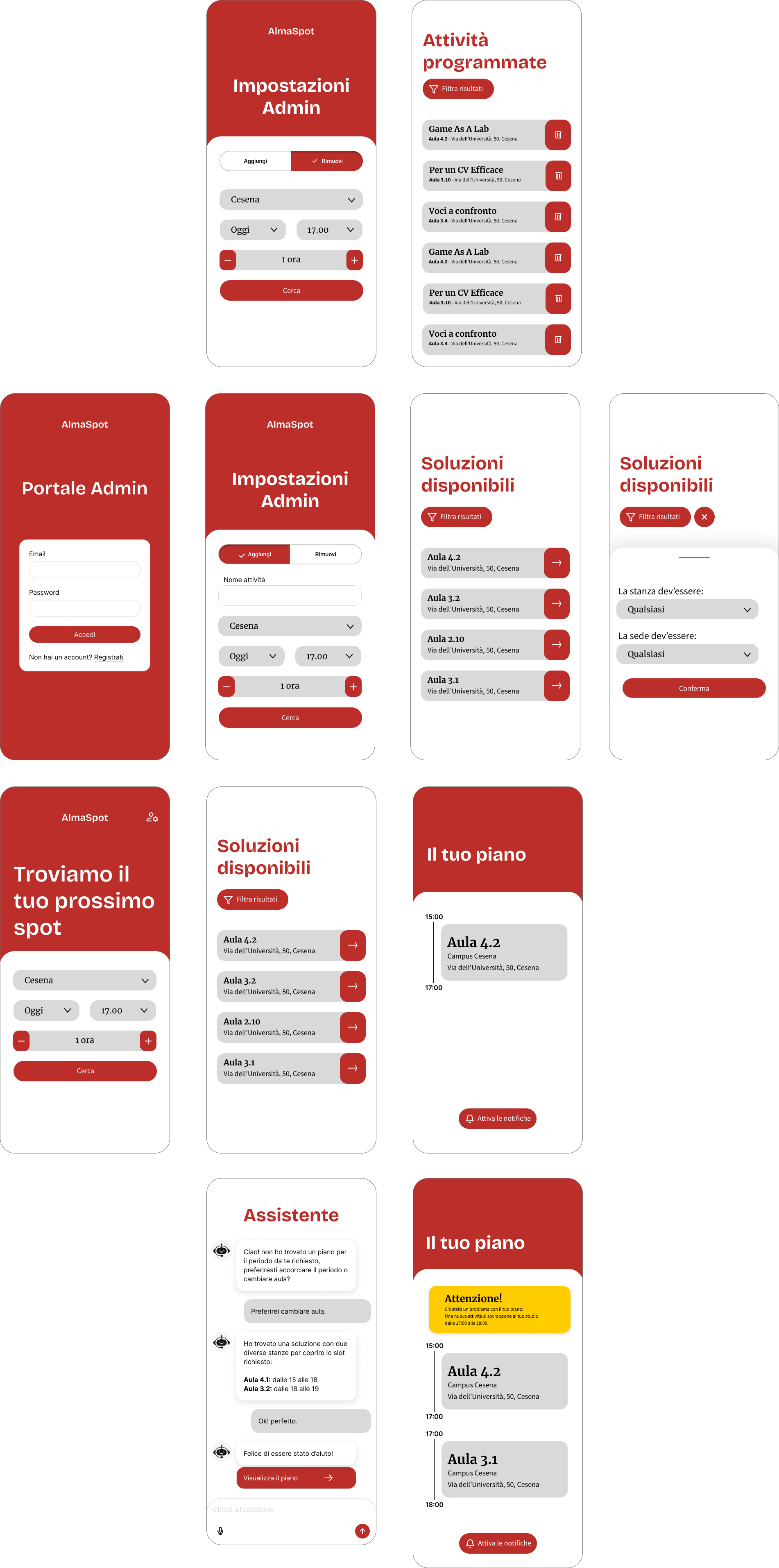
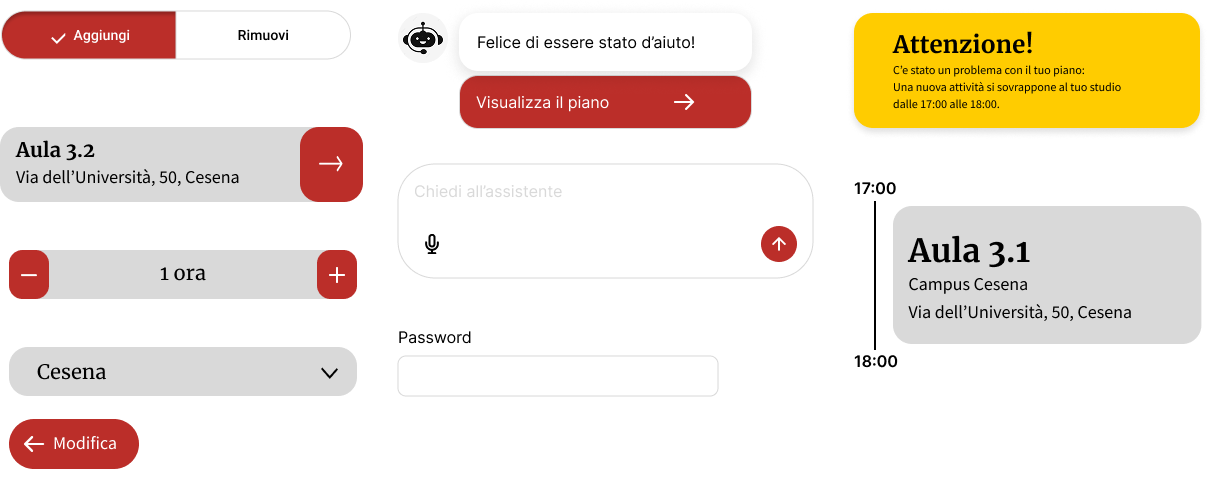
These mockups show a consistent design language that emphasizes usability and clarity. When designing the interfaces, we first defined a set of reusable components, such as buttons, input fields, and cards for displaying room information. This approach ensures visual consistency and streamlines the development process by ensuring that common elements behave uniformly throughout the application.
The resulting collection of UI components extracted from the mockups is shown below:
Finally, for the desktop version of the application, we plan to adapt the layout to take advantage of the larger screen real estate. However, the core components and user flows will remain consistent with the mobile design to ensure a seamless user experience across all devices.
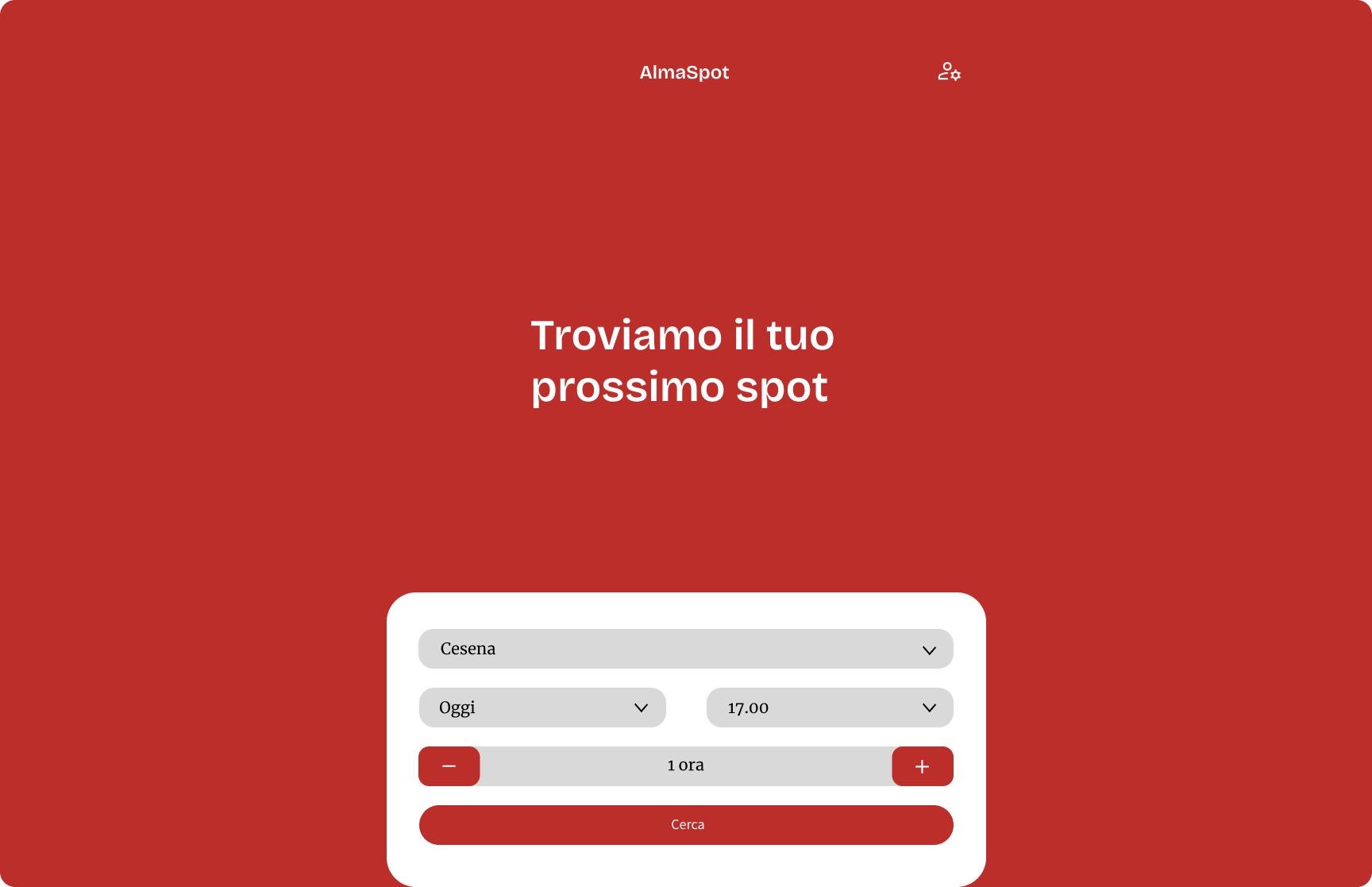
Below is an example of how the home page could look on a desktop interface: